


Description
Product Description
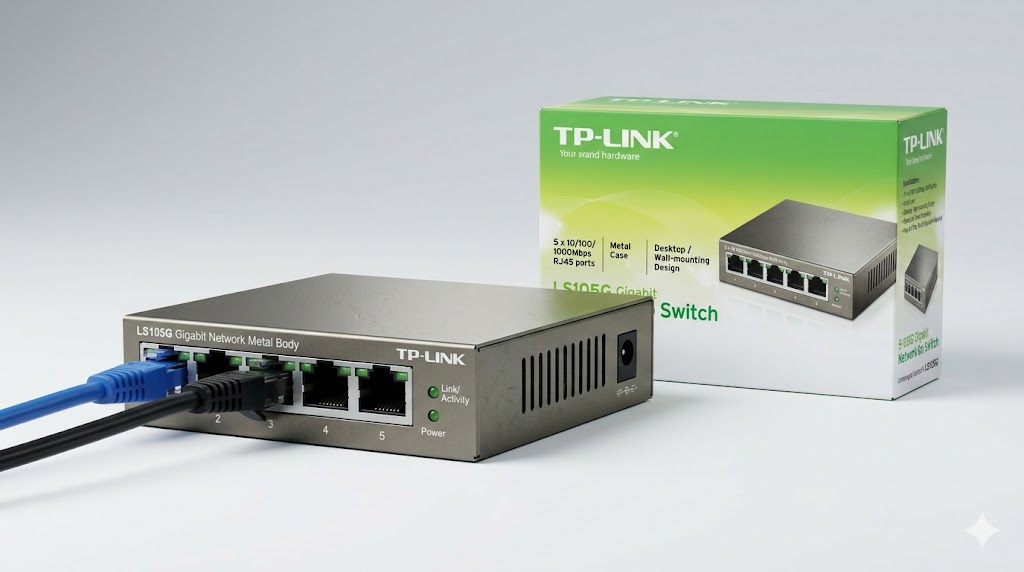
The TP-Link LS105G is part of TP-Link’s LiteWave series of unmanaged Gigabit switches designed for simple, high-speed network expansion without configuration. It provides reliable wired connectivity for small offices, home networks, IP cameras, and access points.
With 5 × Gigabit RJ45 ports, it enables fast data transfer for devices such as computers, printers, IP cameras, smart TVs, and wireless access points. The switch is designed with a fanless metal housing for silent operation and improved heat dissipation.
It supports plug-and-play installation, meaning no software or configuration is required. Auto-negotiation and Auto-MDI/MDIX simplify setup and eliminate the need for crossover cables.
Specifications (Verified & Accurate)
📡 Ports & Interface
- Gigabit Ethernet Ports: 5 × 10/100/1000 Mbps RJ45
- Auto MDI/MDIX: Supported on all ports
- Standard: IEEE 802.3, 802.3u, 802.3ab
🚀 Performance
- Switching Capacity: 10 Gbps
- Packet Forwarding Rate: ~7.4 Mpps (64-byte packets)
- MAC Address Table: 2K entries
- Jumbo Frame Support: Up to 16 KB (model dependent feature in LiteWave series)
🧠 Functionality
- Type: Unmanaged Switch
- Operation Mode: Store-and-Forward switching
- Flow Control: IEEE 802.3x (full duplex), Backpressure (half duplex)
- Plug & Play: Yes (no configuration required)
🛡️ Physical & Build
- Enclosure: Durable metal housing
- Cooling: Fanless design (silent operation)
- Mounting: Desktop or wall-mount support
- Power Supply: External power adapter (low power consumption design)
⚡ Energy Efficiency
- IEEE 802.3az Energy Efficient Ethernet (EEE) support
- Automatically adjusts power consumption based on link status and cable length
Key Features
✔ 5 × Gigabit ports for high-speed network expansion
✔ Plug & play setup – no configuration required
✔ Metal casing for durability and heat dissipation
✔ Fanless silent operation suitable for offices and homes
✔ Energy Efficient Ethernet reduces power consumption
✔ Auto MDI/MDIX eliminates need for crossover cables
Typical Use Cases
✔ Small office or home network expansion
✔ Connecting IP cameras in CCTV systems
✔ Extending router LAN ports for multiple devices
✔ Connecting smart TVs, PCs, and printers
✔ Use with WiFi access points for wired backhaul
Reviews
There are no reviews yet.