


Description
Product Description
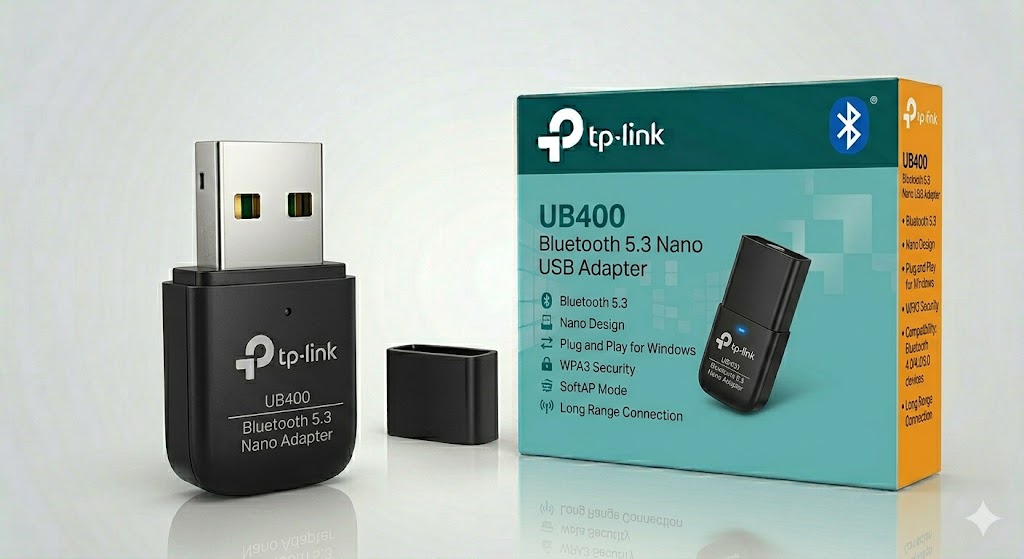
The TP-Link UB400 Bluetooth Nano USB Adapter is a compact and easy-to-use solution that enables Bluetooth connectivity on desktop PCs and laptops without built-in Bluetooth support. It uses Bluetooth 4.0 technology with Low Energy (BLE) for stable, efficient wireless communication with various devices.
With its ultra-small nano design, the UB400 can remain plugged into a USB port without blocking adjacent ports, making it ideal for both laptops and desktop systems. It supports a wide range of Bluetooth devices including headphones, speakers, keyboards, mice, printers, and game controllers.
The adapter supports plug-and-play functionality on Windows 8/8.1/10/11, while older systems may require driver installation. It ensures reliable short-range wireless connectivity with low power consumption and stable performance for everyday use.
Note: The official TP-Link UB400 model is Bluetooth 4.0 (not 5.3). Newer TP-Link models like UB500/UB5A support Bluetooth 5.x.
Key Features
- Nano USB Bluetooth adapter for PC & laptop
- Bluetooth 4.0 with Low Energy (BLE) support
- Ultra-compact plug-and-leave design
- Connects multiple Bluetooth devices (headphones, mouse, keyboard, etc.)
- Stable short-range wireless connectivity
- Plug-and-play on Windows 10/11 (driver support varies)
- Low power consumption
- Supports up to multiple Bluetooth peripherals
- Easy setup and portable design
- Compatible with most Windows systems
Technical Specifications
Bluetooth
- Version: Bluetooth 4.0
- Technology: Low Energy (BLE)
- Backward compatibility: Bluetooth 3.0 / 2.1 / 2.0 / 1.1
Interface
- USB 2.0
Range
- Up to ~10 meters (environment dependent)
Device Support
- Headphones / Earbuds
- Keyboard & Mouse
- Game Controllers
- Printers
- Smartphones & Tablets (file transfer)
System Compatibility
- Windows 7 / 8 / 8.1 / 10 / 11
- Driver required for older Windows versions
Design
- Nano-sized USB form factor
- Plug-and-stay compact design
Power & Performance
- Low energy consumption
- Stable short-range wireless communication
Use Cases
- Adding Bluetooth to desktop PCs
- Connecting wireless headphones or speakers
- Using Bluetooth keyboard/mouse setups
- Gaming controllers for PC
- File transfer between devices
- Office and home wireless peripherals




Reviews
There are no reviews yet.